Recreating Simon Says on a microcontroller means coordinating a light-and-sound sequence with physical button input. The device needs to distinguish playback from player input, check each response, and move between rounds.
Embedded systems
A memory game,
built on real hardware.
Simon Says with physical buttons, light and sound patterns, and a cloud-connected high score system.
The problem.
What I built.
I implemented the pattern generation, input matching, and progression in Embedded C++, with Particle Cloud handling the high score connection.
I integrated GPIO buttons, NeoPixel LEDs, and synchronized audio feedback, and built modular game-state logic for randomized sequences, input validation, difficulty levels, and transitions between gameplay modes.
How it works.
The device generates a randomized sequence, plays it through lights and sound, and waits for the player to repeat it with the buttons. Each successful round adds difficulty.
Physical input
Four tactile buttons let the player repeat the sequence through GPIO input.
Sequence logic
The Photon 2 runs the randomized pattern and checks each response.
Light & sound
LED patterns and a piezo speaker provide feedback for the game.
Connected scores
Particle Cloud connects the device to a high score system.
The outcome.
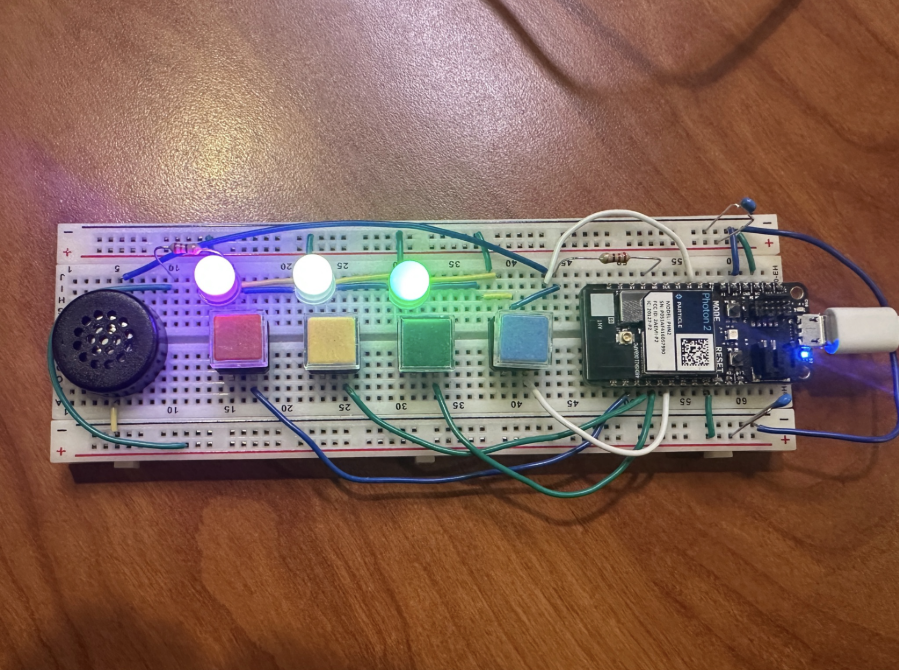
A completed physical memory-game prototype. The Photon 2 connects four buttons, LEDs, and a piezo speaker into a playable sequence game, with a cloud-connected high score system.
The photo shows my actual breadboard. The browser demo below illustrates the interaction separately from the original hardware.
Embedded C++Particle Photon 2GPIONeoPixelParticle Cloud
Try the idea.
Watch the numbered pads, then repeat the sequence. This small browser demo explains the interaction; the original project runs on the physical hardware shown above.
Use the buttons or number keys 1–4.
Memory challengeRound 0
Watch the sequence. Then repeat it.
Interactive concept demo. The original project runs on physical hardware.